Conditions and branching
A condition is a fork on the canvas: the flow checks something and takes the “yes” path or the “no” path. It is what turns a set of steps into logic.
What it looks like
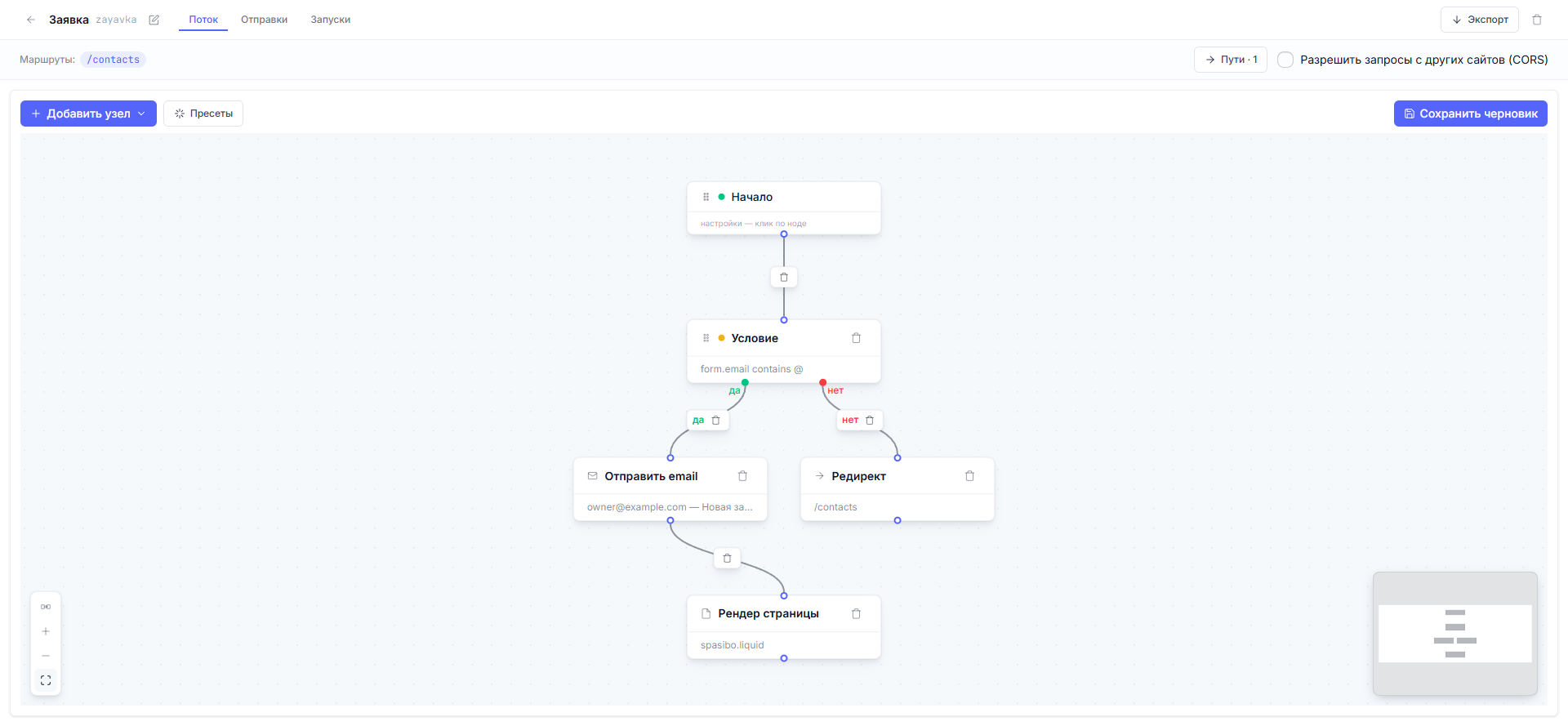
The “Condition” node is added via “Add node” → “Condition”. It has two outgoing points: the green “yes” and the red “no”. Each can get its own chain of steps.
What you can check
In the panel, a condition is one or more rows of the form “field — operator — value”. The rows are combined by a switch: “and” (all must match, the default) or “or” (at least one).
The operators, in plain language:
| Operator | The check |
|---|---|
| equals / not equals | An exact match of text or a number |
| greater / greater or equal / less / less or equal | Numbers and dates |
| contains | A substring occurrence: form.email contains @ |
| matches pattern | A regular expression, for strict format checks |
| password matches | Comparing the entered password with a hash from the CMS (for member sign-in) |
| token is valid | Checking a one-time link from an email (password reset, confirmation) |
Three subtleties:
- In the values for “password matches” and “token is valid” you can
substitute data (
{{ results.… }}); the other operators compare the value literally. - Visitor cookies are available to checks too —
cookies.name. The “Members only” mode is built on this check (it is enabled on the “Start” node and needs no manual conditions). - If a check breaks (a typo in a field name), the condition counts as not matched — the flow takes the “no” path. A safe fallback.
An example from the “Request” flow (see the shot above): one row,
form.email — contains — @. The visitor entered an email — we go write the
letter and show “Thank you”; they left junk — we politely return them to the
form.
A few ready recipes. Each is one or two rows in the condition panel; the expression is written whole: field, operator, value.
The email looks like an email — the letter goes to you, otherwise back to the form:
form.email contains @
Consent to processing — accept the request, otherwise show a page asking to confirm consent:
form.agree equals yes
A promo code from a list — a discount in the letter, otherwise the regular price. Several allowed values — several rows combined with the “or” switch:
form.promo  equals  BLACKFRIDAY
form.promo  equals  SALE30
Adults only — the regular path, otherwise a refusal:
form.age greater or equal 18
Corporate email — the request goes to sales, otherwise the general pool. A regular expression cuts off the popular free domains:
form.email matches pattern .*@(?!gmail|yandex|mail)\..+
Regular expressions are a precise but fragile tool: get one character wrong and the condition starts silently dropping valid requests. So always test a complex regex on the preview with several different values, and where a simple “equals” with a list of values joined by “or” will do — use that instead.
To try it live: primer.dynapi.ru/contacts — submit the form with an empty email field and the condition sends you back; with it filled in, you get a confirmation letter and the “Thank you” page.
An expression instead of “field — operator — value” rows
The condition has a second mode: the “Expression (expr-lang)” switch —
and a single boolean expression chooses the branch (the node config field
is predicate_expr). When both the rows and the expression are filled,
the expression wins — the rows stay in the node as the editor’s
fallback copy.
An example — “the member is signed in and found in the CMS as active”:
member.id != nil && member.id != ""
  && len(results?.login?.members ?? []) > 0
  && results.login.members[0].status == "active"
This shows the main list-reading rule: ?. protects key access but not the
[0] index — reading the first element is covered by the length check, and
the && short-circuit keeps the index from running on an empty list.
What matters:
-
The result must be
trueorfalse. A compile error or a read through a nil chain stops the flow with a visible error in the run journal — neither “yes” nor “no” is picked silently. A missing field isnil; compare against it explicitly —!= ""alone is not enough (for a missing fieldnil != ""is true). -
The expression carries function equivalents of the row operators:
bcrypt_matches(candidate, hash)— comparing a password with a hash from the CMS (same as “password matches”),token_valid(token, purpose, hash)— checking a one-time email link (same as “token is valid”) — plus the digests for webhook signatures:md5_hex/sha1_hex/sha256_hex/sha512_hexand the HMAC variants likehmac_sha256_hex(secret, input). A signature check as one expression:hmac_sha256_hex(secret("whsec"), raw_body) == headers["X-Signature"] -
Project secrets are read via
secret("name"); an unknown name denies the check (the safe fallback). -
Saving checks compilation: a non-compiling expression is rejected.
The “field — operator — value” rows are the LEGACY mode: they work and stay
supported, but new logic should prefer the expression. One exception —
composite signatures with key rotation (Stripe t=…,v1=…): they are still
verified only by the row mode — the “Webhook signature matches
(digest/HMAC)” operator.
The “no” branch is optional
If the condition only has the “yes” path connected, a failed condition simply ends the flow (the visitor stays on the same page). Nothing needs to be drawn for symmetry’s sake.
A common question: what if a branch has several steps?
Chain the steps inside the branch — “yes” can lead to a letter, then to the “Thank you” page, while “no” goes straight to a redirect. Branch length is unlimited; inside a branch you can also put another condition and get a third level of forking.
Making a flow loop (a link back to an earlier node) is something the platform won’t allow — saving is rejected with an error.
Next article: Routes: how a visitor reaches a flow →