Wiring the catalog to an outside service over a signed webhook
The library has outgrown its demo-catalog stage. It has a private admin, reader accounts, filters, covers, and two languages. One neighbor is still missing — the outside world. A print shop that receives an order for every new copy, a delivery service that hears about each loan, a bookkeeping system that pushes back its own status. Every integration has two halves: your flow calls someone else’s API, and someone else’s service calls your flow back.
In this part we close both directions, using a print shop as the partner. Add a book — the flow sends the shop a print order carrying the shared key in a header. The shop answers with an order number, and when the copy is ready it fires a signed webhook that moves the book to “Ready for pickup” in the catalog. Earlier parts of the series: building a private admin, reader accounts, filters and honest errors, covers from the media library, two languages from a single record.
The credentials for both halves live outside the flow documents from the start — the platform keeps them in a dedicated store.
Two secrets in the store
The “Site” section now has a “Secrets” tab: a list of names and a form. You invent the name; the value is your real key (printshop_key) and the shared signing secret (printshop_signing). In the demo they are made-up values — in a live project the partner hands them to you.
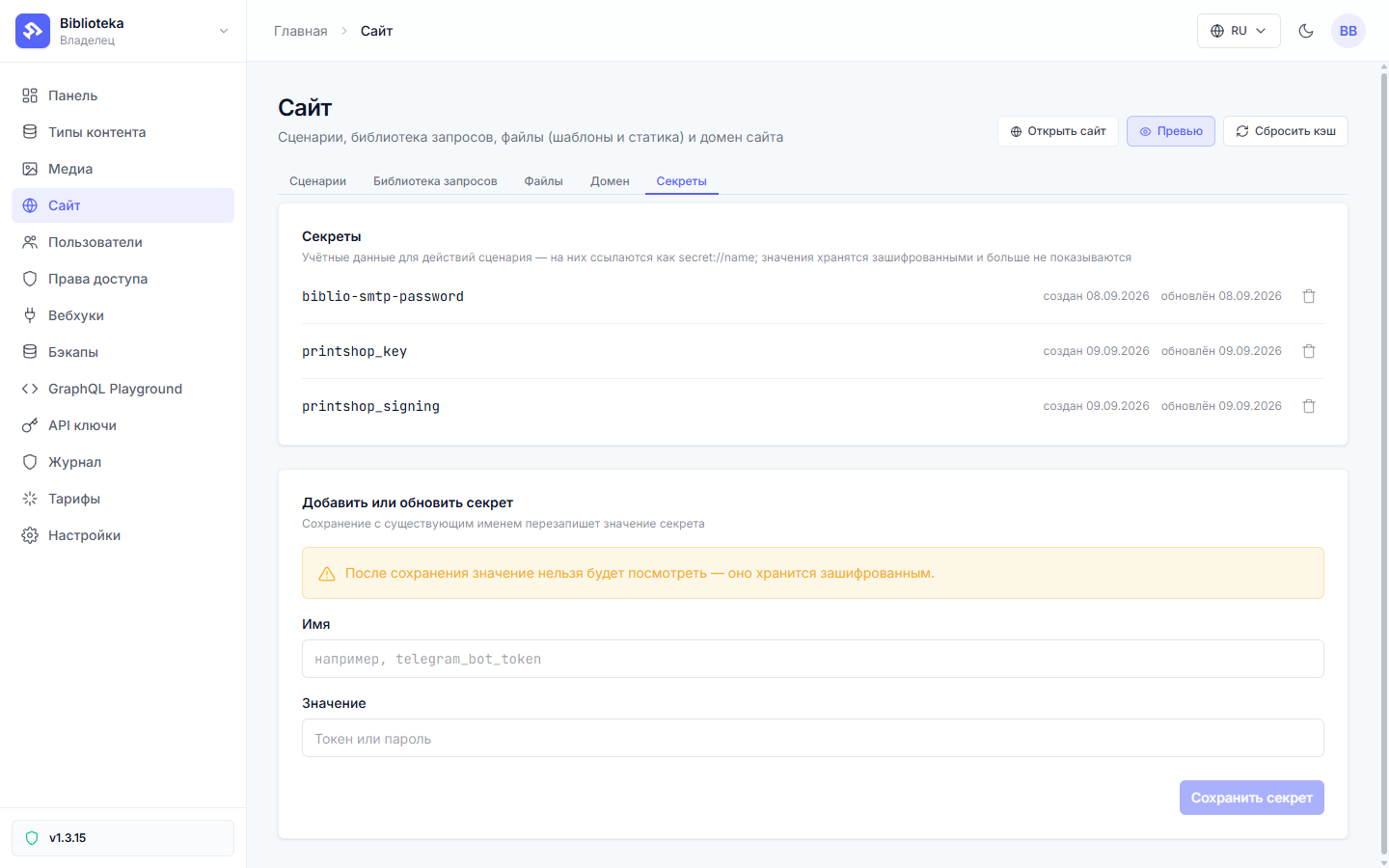
The store is one-way. The platform encrypts each value, and after saving you can never read it back — not in the UI, not through the API. You can overwrite it, delete it, or reference it. A reference reads secret://printshop_key and takes the whole value slot in a flow document. The engine substitutes the real key at the last moment, right before execution, and swaps it back for the reference in journals and dry-runs. An unknown name fails the action with SECRET_NOT_FOUND, and nothing ships to your partner.
The flow calls the print shop
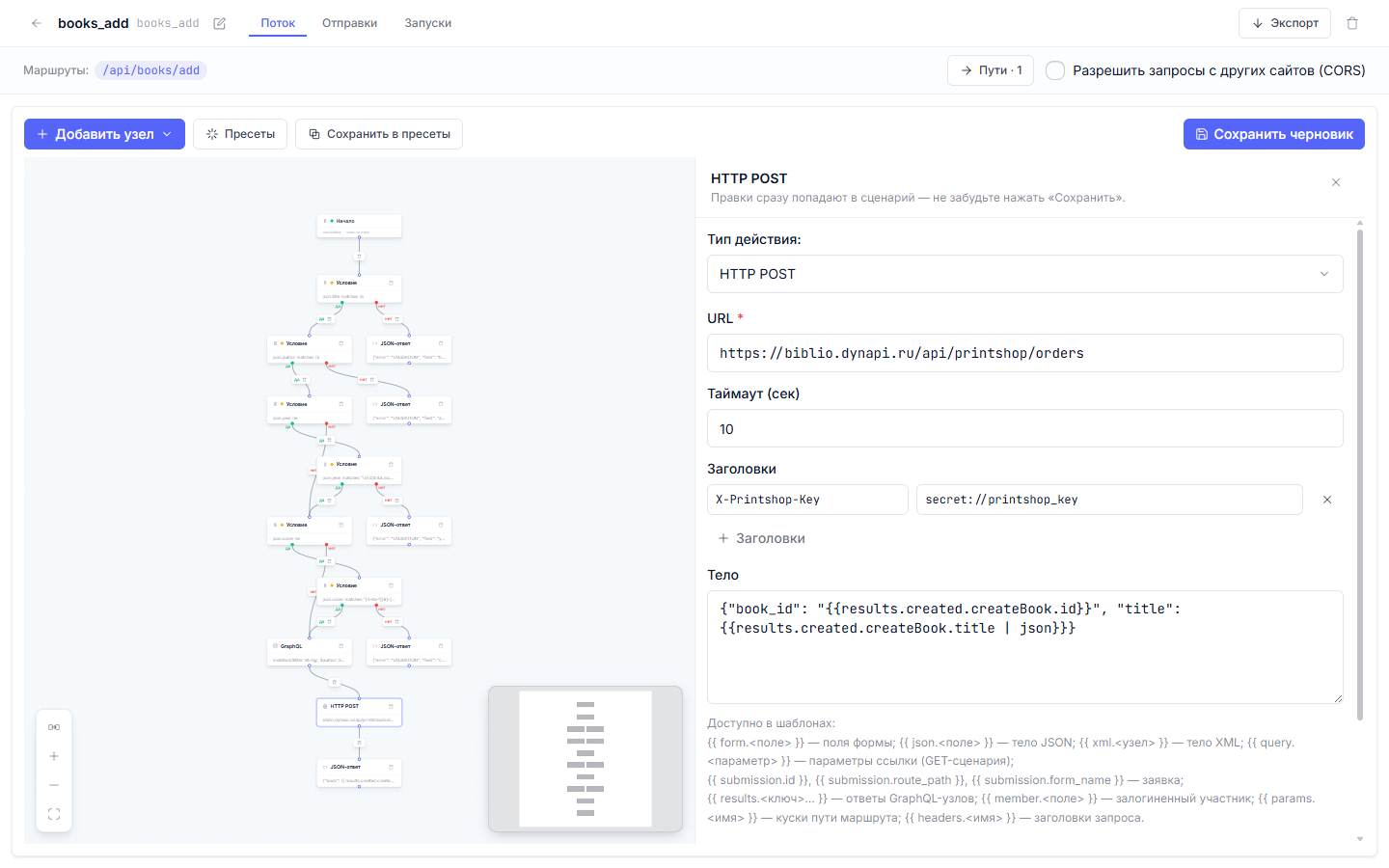
In books_add, a new HTTP POST node now sits behind the book creation. Once createBook returns the record and marks it print: "ordered", the flow assembles the order:
{

  "action_type": "http_post",

  "config": {

    "url": "https://biblio.dynapi.ru/api/printshop/orders",

    "headers": { "X-Printshop-Key": "secret://printshop_key" },

    "body_template": "{\"book_id\": \"{{results.created.createBook.id}}\", \"title\": {{results.created.createBook.title | json}}}",

    "result_key": "printshop",

    "timeout_sec": 10

  }

}
Liquid runs in all three fields: the URL, the headers, and the body. The header value is a whole-slot secret reference — the real key touches the wire only at dispatch time. The body is assembled from the graphql node’s answer, and the | json filter escapes the title so the quotes in “Dead Souls” cannot break the JSON. The flow sets Content-Type: application/json on its own; the default timeout is ten seconds.
Today the order body is built by body_expr — as a value, not as text:
{ "book_id": results.created.createBook.id, "title": results.created.createBook.title }
The value is encoded as data: quotes in the title escape themselves, a number stays a number, and a broken JSON body is not a thing. On “HTTP POST” the Liquid form body_template with | json is the marked legacy path — it still works and remains in the demo branch (on the “JSON response” node that path was removed from the engine in v1.4.16 — there body_expr is the only builder), but new bodies are built with body_expr. When a secret is needed inside an expr field, it reads as a call — secret("printshop_key"); in Liquid fields (like this header) the whole-value secret:// reference applies.
result_key decides the response’s fate. With it, the parsed partner body lands in results.printshop — later nodes can branch on it. Without it the response is discarded; a journal snippet survives, but nothing reaches the flow.
The receiver admits requests by key
So the demo can run without an account at an outside company, the print shop is played by a second route of the same project. Protocol-wise it is a regular third-party API: with a live partner you swap the address and the auth scheme, the skeleton stays.
The order receiver is the /api/printshop/orders route with two outcomes. A condition compares the header against the stored secret — the second place where a secret:// reference is allowed:
{

  "field": "headers.X-Printshop-Key",

  "operator": "eq",

  "value": "secret://printshop_key"

}
A match answers {"accepted": true, "order_id": "P-…"}, with the number cut from a fresh UUID. A miss answers 403 {"error": "BAD_KEY"}. Header names in conditions use their canonical form, headers.X-Printshop-Key, exactly as the HTTP server reports them.
The response arrives with a signature
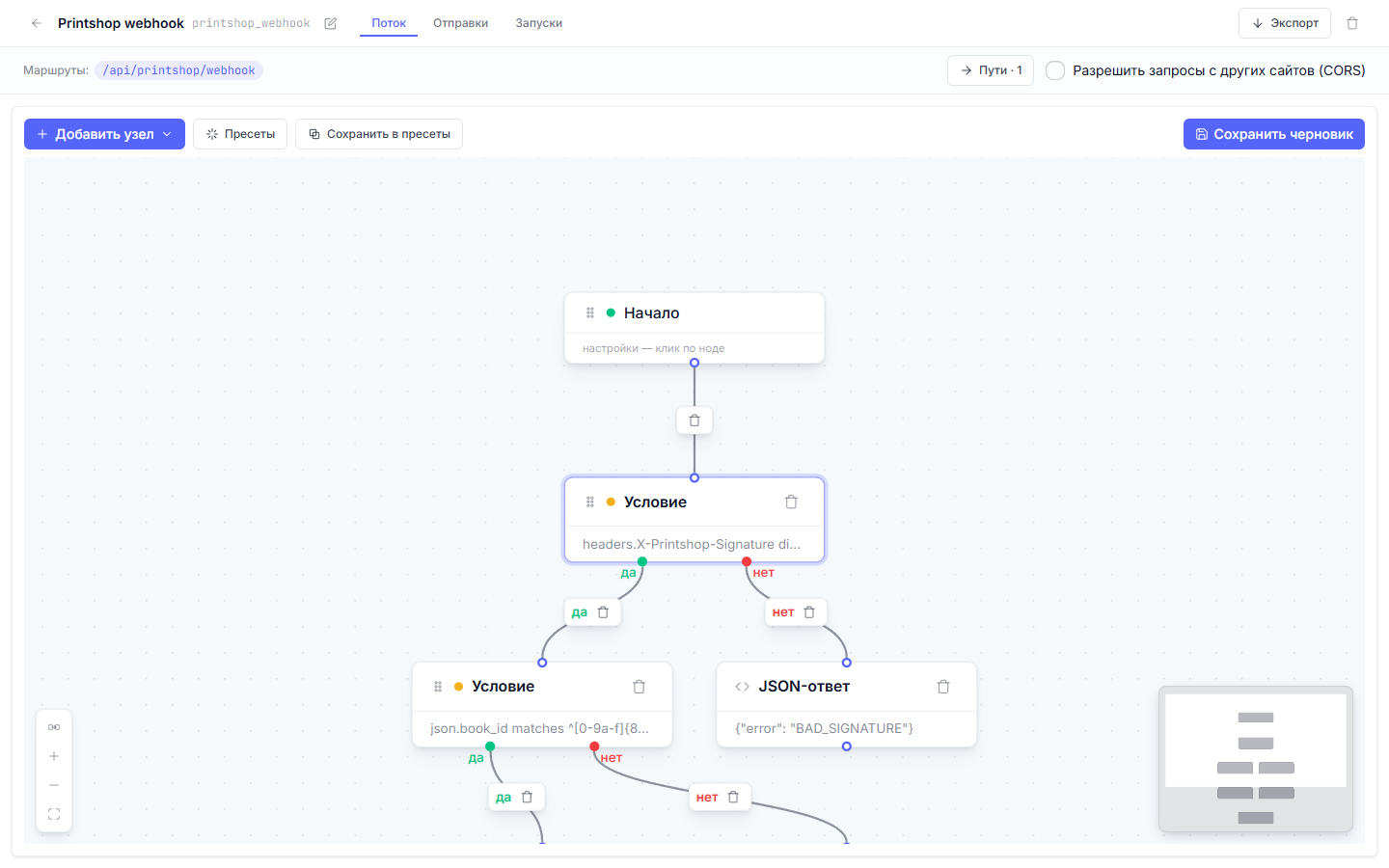
When the copy is ready, the print shop calls POST /api/printshop/webhook. Trusting the caller is not an option: the route is public, so a signature has to prove the body was assembled by whoever holds the shared secret and was not altered on the way. The whole gate is one condition:
{

  "field": "headers.X-Printshop-Signature",

  "operator": "digest_matches",

  "value": "hmac-sha256|secret://printshop_signing|{{raw_body}}"

}
It pays to read it piece by piece. raw_body is the exact request bytes, up to a megabyte, on JSON and XML bodies; signatures verify against those bytes, not against a parsed map whose ordering and escaping may not have survived the trip. The spec reads as algorithm|secret|input, and secret:// inside it is the only place a secret reference is allowed short of a whole value. The signature itself rides in a header and may be hex or base64 — case and padding do not matter.
The algorithm set covers sha256, sha512, legacy md5/sha1 for old provider schemes, and HMAC variants of all four. Composite signatures like Stripe’s t=169…,v1=… and prefixes such as sha256=/v1= unwrap automatically; any matching element in the list counts. Anything that fails to match, fails to parse, or references an unknown secret goes to else — a webhook gate never passes on garbage.
The gate also has an expr form: in a predicate_expr the signature is compared as a raw hex digest — hmac_sha256_hex(secret("printshop_signing"), raw_body) == headers["X-Signature"] (the hyphen in the header name requires the bracket form). Composite signatures like Stripe’s t=…,v1=…, base64 encoding and sha256= prefixes stay with the digest_matches clause — it unwraps them on its own; the expr comparison takes raw hex only.
The then branch holds a graphql node: updateBook moves the book to print: "ready", and the flow answers {"ok": true, "book": {…}}. The else branch answers 403 {"error": "BAD_SIGNATURE"}. A forged header cannot forge the outcome — only a secret holder can change the book.
The answer in the catalog and in the journal
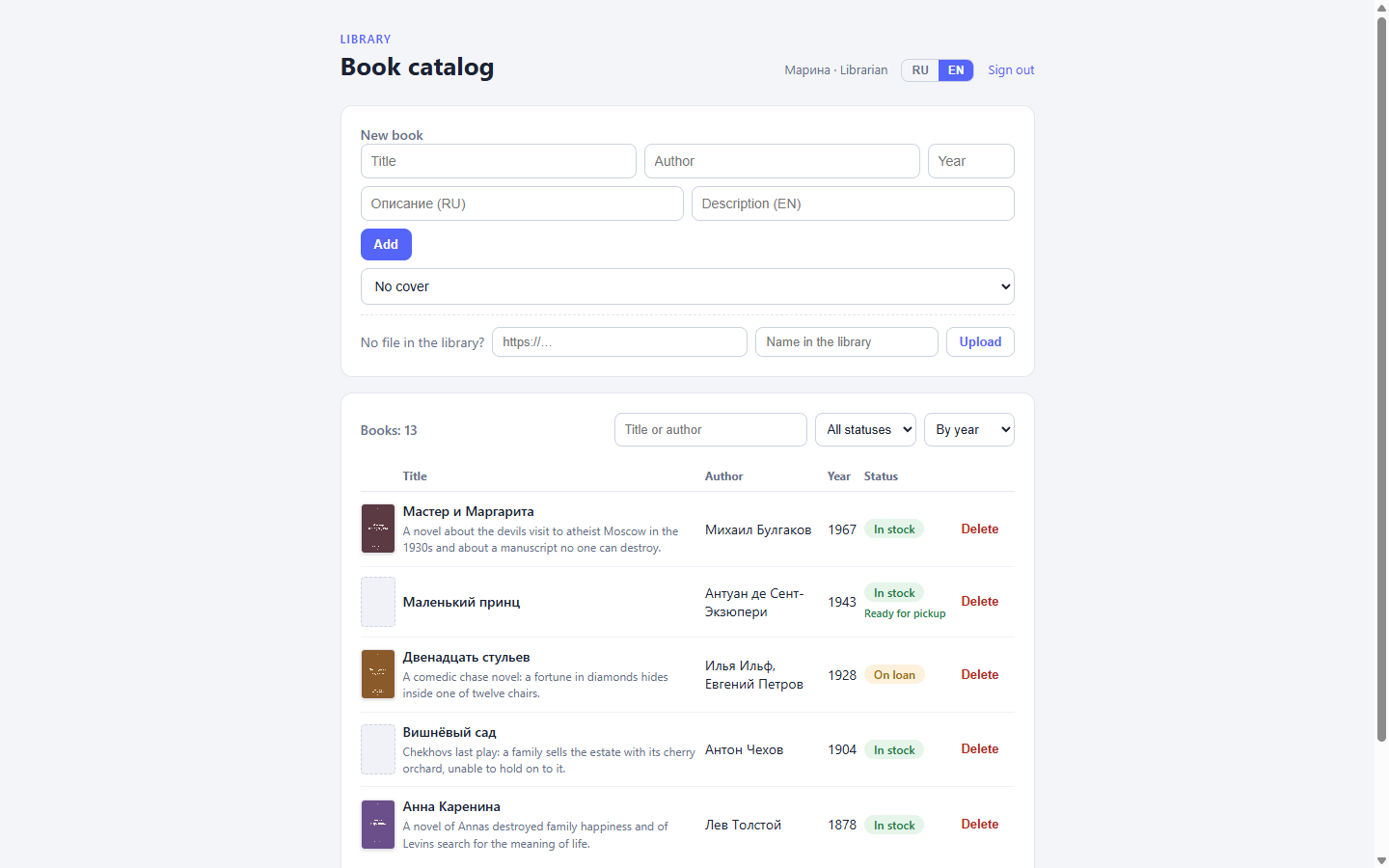
The flow hands the client both things in one response: the book and the outcome of the external call. The form prints the order number on its own line, and a quiet “At the print shop” note appears under the status pill — the state of someone else’s process layered over the book’s unchanged status:
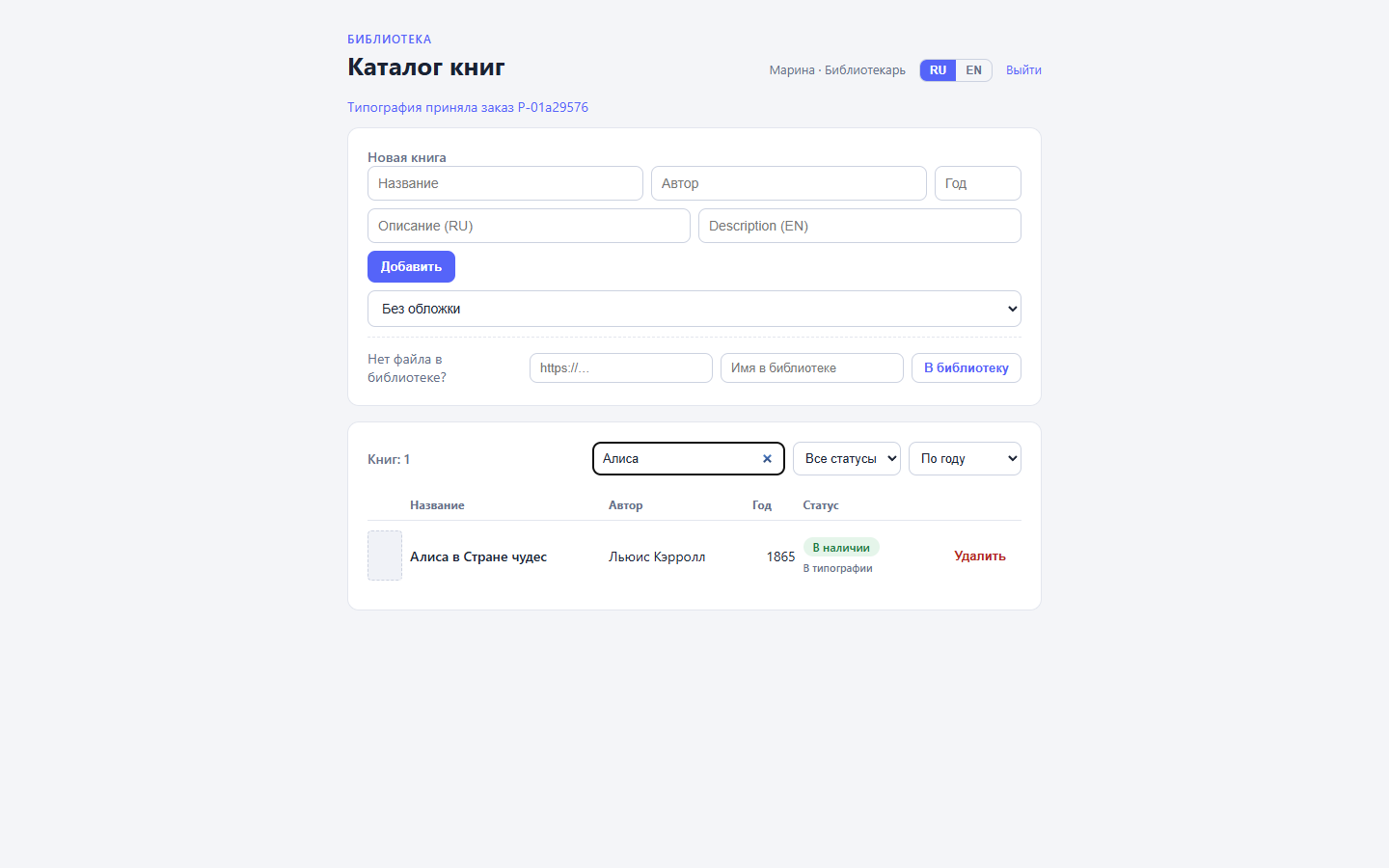
If the print shop goes silent, the book is still created. An http_post error only spoils its own node — the chain continues, the response carries "printshop": null, and the interface says honestly that “no order was sent”. An external integration must not cost the catalog a record.
The second half of debugging lives on the “Runs” tab. The http_post step unfolds into a request and response dump, and in that dump the key is once again secret://printshop_key — the engine put the reference back in place of the value:
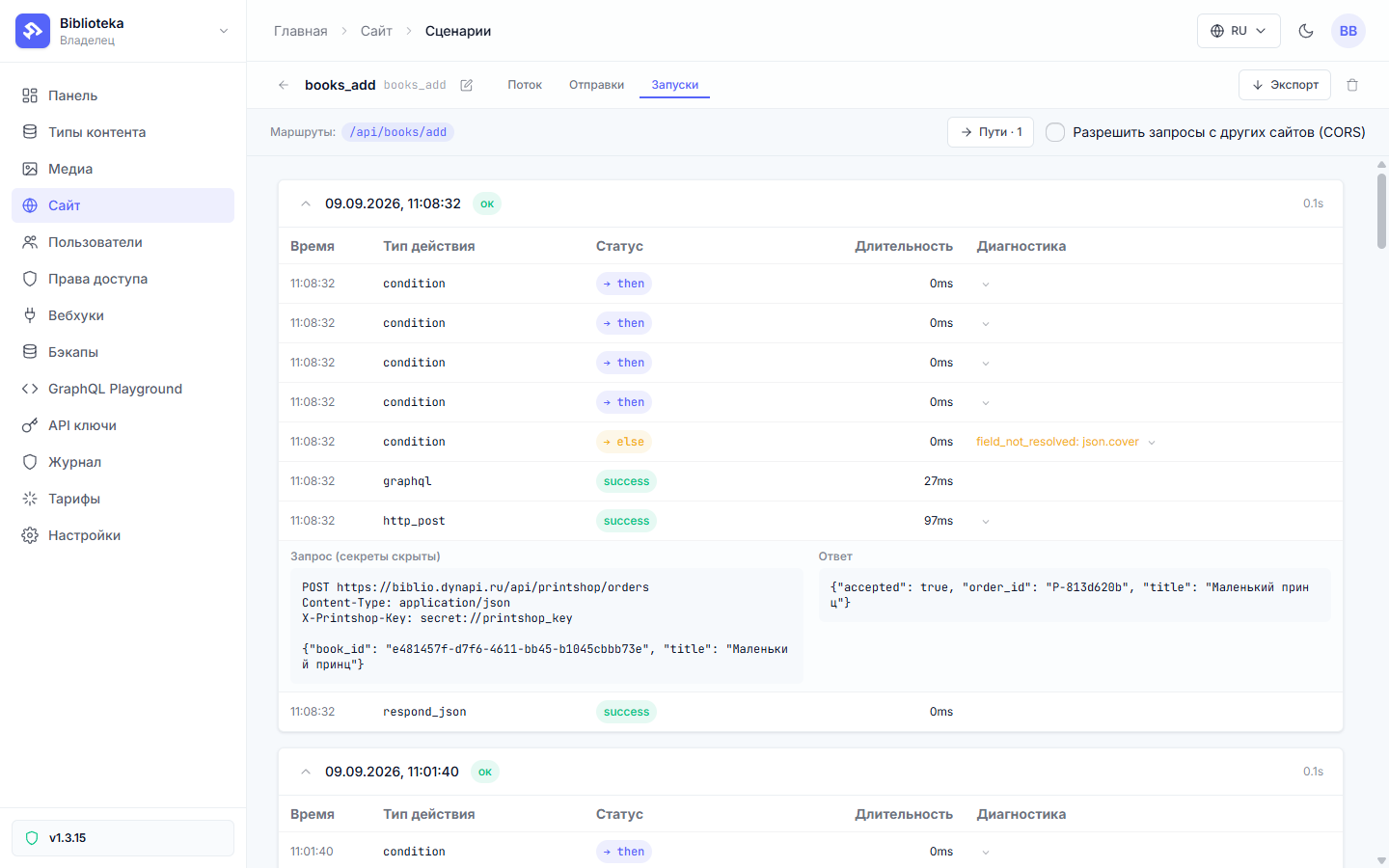
The response snippet keeps the first five hundred characters from the partner — and that covers failures too. On a 4xx or 5xx the step errors, but the peer’s error body stays in the journal, so you can figure out why the partner is unhappy without touching their logs. The request is masked before it is written; the secret never reaches even the text of a failed run.
After the webhook the same book looks like this — the note turned green, and the interface in the shot is switched to EN with the toggle from the previous part:
Still off-screen
Dry-run can rehearse the calls: a node without result_key is suppressed in rehearsal and never fires, a node with it takes its answer from the httpResults mock in the context, and conditions with secrets evaluate against the real stored values — the branch takes the same course it will in a live run.
You can also sign outgoing requests yourself: the templates expose sha256 and hmac_sha256 filters (plus md5, sha1, sha512 and their HMAC variants) that return hex. An empty input or an empty key produces an empty string. notify_telegram is the ready-made call for a chat bot, in case the partner’s API turns out to be Telegram.
A secret in the URL is a bad idea even with journal masking: the whole address ends up in the partner’s logs and in any proxies on the way. A key belongs in a header or in the body.
One resident of the demo is still off-screen — the assembly itself. The next part of the series is about handing the admin to an AI agent: a pack of instructions and flowctl, with which an outside assistant builds the types, flows, and pages on its own.
All the .dynflow.json files from this part live on the step-9-external branch: the updated books_add plus the receiver and the webhook, published with flowctl apply flows/printshop_webhook.dynflow.json --publish.
All posts