An AI agent builds the catalog admin from one instruction
Six parts of this series assembled a library catalog with a closed Vue admin, reader accounts, filters with honest errors, covers from the media library, two languages, and a print-shop order behind a signed webhook. All of it exists in a live project, and all of it was set up by someone: content types, flows, routes, templates. Time to tell who set it up in the demo — and why the next feature need not be set up by hand at all.
In this part the catalog gets book loans from an AI agent — the same class of tools as Claude Code, Cursor, or Qwen Code. A human writes a one-page instruction: which content type, which endpoints, which panel in the interface. The agent then reads the platform’s documentation package and works from the command line. It saves queries, assembles flows, publishes routes, and iterates on failures through the run journal. Earlier parts of the series: building a closed Vue admin, reader accounts, filters and honest errors, covers from the media library, two languages from one record, an outside service and a signed webhook.
There is no “built-in agent” in the platform — and none is needed. It is enough that the whole site is reachable through an API and the rules for working with it are packed into a bundle any external tool can read.
The documentation package, the key, the CLI
The agent needs three things, and the platform provides all three.
The dynapi-site-dev package — instructions in the skill format: when and how to create types, what a flow is made of, how the site is read, where errors surface. It lives at dynapi.ru/cms/agent-skill/, where a human can read it, download it as agent-skill.zip, or drop it into a code editor as a project reference. Inside are eight documents: workflows, the GraphQL API reference, the catalog of flow actions and conditions, Liquid rules, the member-account mechanics. The same package feeds the human-facing docs: the AI agents section restates the rules in prose.
A project key — dca_…, created in the admin under “Ключи доступа” (Access keys). For site building the scopes site:manage, data:write, and media:write are enough; the key itself tells the platform which project a request belongs to. The key is never committed and never pasted into flow documents — it lives in the DYNAPI_APIKEY environment variable.
flowctl — the CLI, downloaded from the same package (agent-skill/cli/flowctl-linux-amd64, with Windows and macOS builds). The GraphQL endpoint is built in, so setup means passing the key. Inside — entity for content types and records, query for the query library, validate and dryrun for pre-publish flow checks, apply for import, route for the route map, files push for templates and static assets, runs for the run journal, media and secret for the library and secrets.
A one-page instruction
Build quality tracks instruction quality. A good document describes the outcome, not the clicks: “a type with these fields, endpoints with these contracts, a panel with this behavior”. The rest is working rules and an explicit out-of-scope list, so the agent cannot improvise its way into bloat.
The instruction for book loans looks like this, and the agent executes it literally:
# Задача для агента: выдачи книг в каталоге

Проект — каталог небольшой библиотеки на `biblio.dynapi.ru`.
Работаешь по скиллу `dynapi-site-dev`; инструмент — `flowctl`, ключ в
переменной `DYNAPI_APIKEY`. Ничего не изобретай: контракты действий и
условий — в справочниках скилла, и всё опубликованное проверяй живьём.

## Что нужно построить

Читатели берут книги на руки. Добавь каталогу выдачи: один тип контента,
четыре сценария-эндпоинта и раздел «Выдачи» в админке каталога.

### 1. Тип «Выдача» (loan)

| поле     | тип                                          | правила      |
|----------|----------------------------------------------|--------------|
| book     | запись → Книга                               | обязательное |
| member   | запись → Читатель                            | обязательное |
| due_date | дата                                         | обязательное |
| status   | выбор: active «На руках» / returned «Возвращена» | обязательное |

Схему заведи в редакторе схемы или мутацией `createEntity`
(api-reference §4). Прежде чем писать сценарии, дождись пересборки схемы:
`flowctl entity schema loan` должен показать все четыре поля.

### 2. GET /api/members — читатели для селекта

members-only. JSON: `{"members":[{"id","name","email"}…]}`, по алфавиту имён.
Запрос сохрани в библиотеку запросов под именем `members_list`.

### 3. GET /api/loans — активные выдачи

members-only. JSON: `{"loans":[{"id","due_date","book":{title},"member":{email}}…]}`.
Только `status = active`, по возрастанию `due_date`. Запрос — в библиотеку
под именем `loans_list`.

### 4. POST /api/loans/issue — выдать книгу

members-only. JSON-тело: `{"book_id", "member_id", "due_date"}`.
Проверки по очереди, у каждой свой ответ 400 с именем поля:
`book_id` и `member_id` — UUID, `due_date` — дата `ГГГГ-ММ-ДД`.
Успех: `createLoan` со `status: active` → 201 `{"loan":{…}}`.
Если записи с таким id нет — 400 `{"error":"REF_NOT_FOUND"}`.
Мутацию можно оставить инлайн: библиотека — про чтение страниц,
не про разовые действия.

### 5. POST /api/loans/return — принять книгу обратно

members-only. JSON-тело: `{"loan_id"}`; UUID-проверка → 400 с именем поля.
`updateLoan(status: returned)`. Выдачи с таким id нет →
404 `{"error":"NOT_FOUND"}`, успех → 200 `{"ok":true}`.

### 6. Раздел «Выдачи» в админке (spa/)

Под каталогом — панель «Выдачи»: таблица активных выдач (книга, читатель,
«вернуть до», кнопка «Вернул»). Сама выдача — из строки каталога: кнопка
«Выдать» раскрывает в строке селект читателя и дату возврата. Ошибки — как в
форме книг: баннер с сообщением сервера и подсветка поля. После выдачи и
возврата перечитывай список. Обе локали словаря (RU и EN). Пересобери бандл,
запушь статику (`flowctl files push`) и подними `?v=` в `admin.liquid`.

## Правила работы

- Цепочка на каждый сценарий: `validate` → `dryrun` (пустое тело, мусор в
  полях, счастливый путь) → `apply` вместе с маршрутом → живая проверка →
  `runs`. Dry-run мокает graphql-действие — честный ответ сценария
  проверяется только живым вызовом и журналом прогонов.
- Маршруты members-only: JSON-клиент без сессии получает 403, а не редирект.
- Ключ не попадает в файлы репозитория и в тексты сценариев.
- Секретов в этой задаче нет; если появятся — только `secret://`, не инлайн.

## За кадром (не делаешь)

- Одна книга — одна активная выдача: проверку не вводим.
- Уведомления читателям: в демо нет SMTP.
- История возвратов: выданные и возвращённые показываем только активные.

The document contains no flow document and not a line of Liquid. Only contracts, query-library names, error codes, and an explicit list of what NOT to do.
The type, the flows, the rehearsal
Step one is the schema. The Loan type appears in the type editor: two record references, a date, and a select with two options.
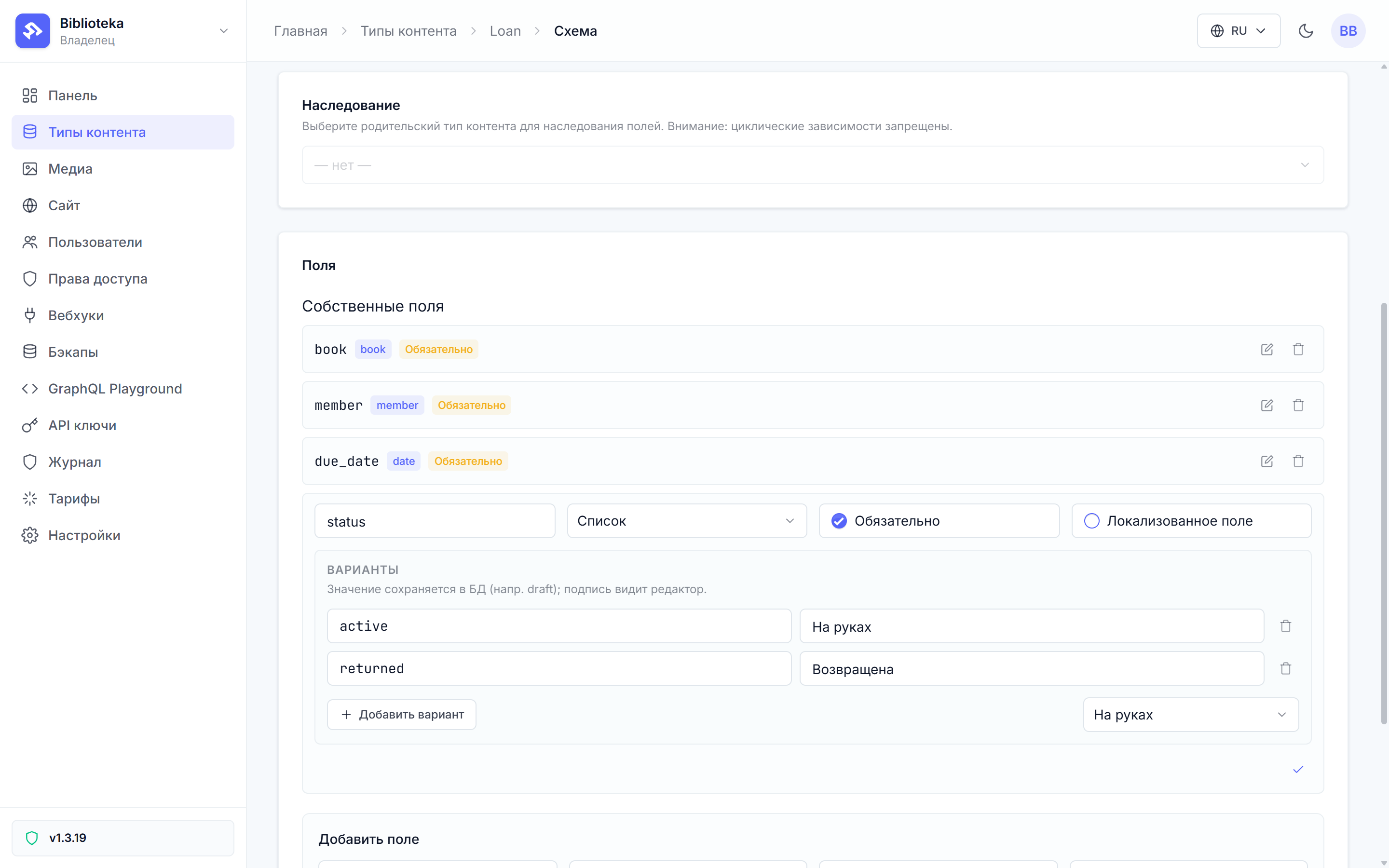
The instruction allows a second path — the createEntity mutation with the recipe from the API reference; for an agent the only difference is where to click. flowctl entity schema loan waits out the schema rebuild and prints all four fields.
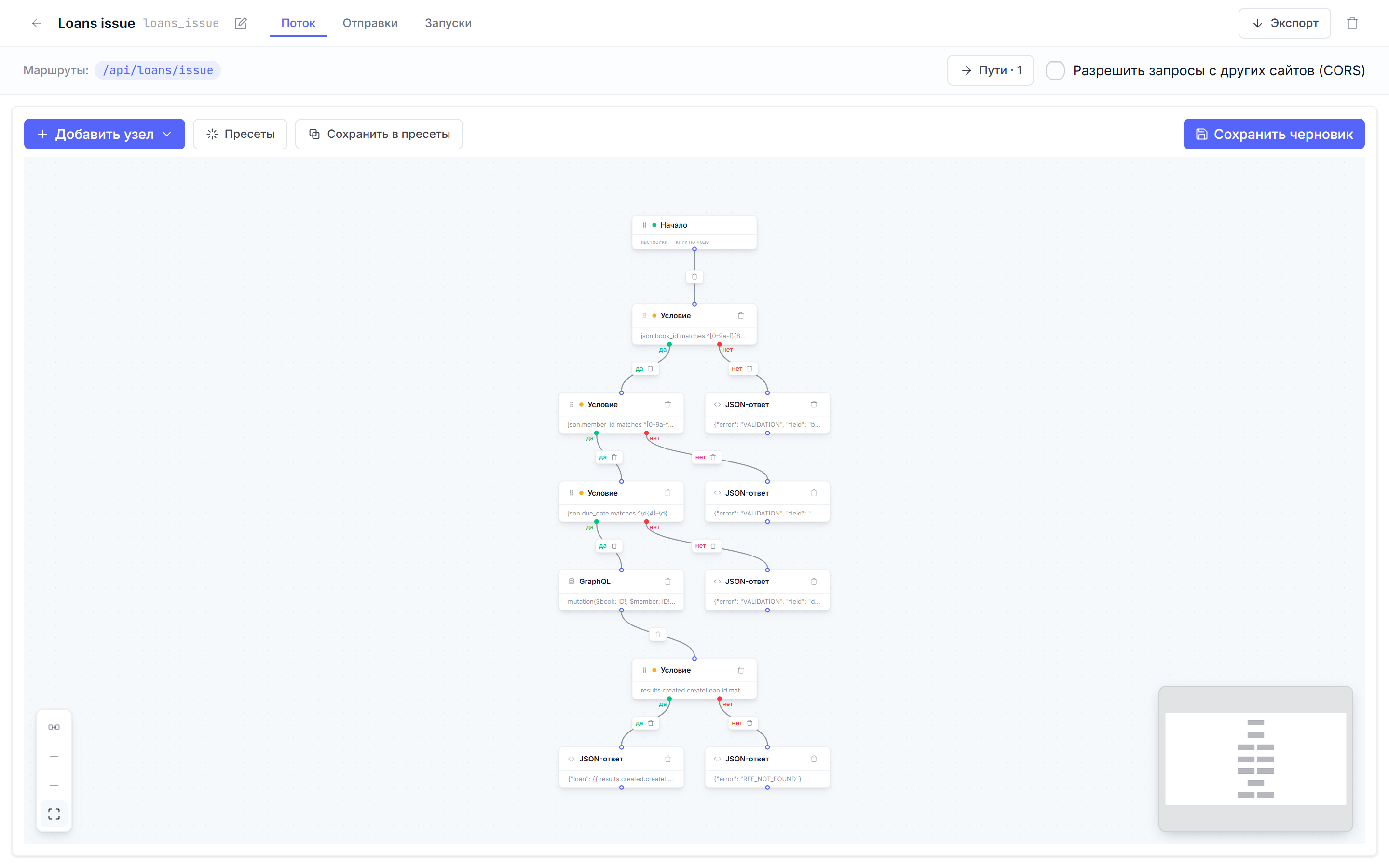
Then the flows. Each one goes through the chain “assembled → checked → published”. The offline validate catches Liquid syntax and graph invariants. The dryrun rehearsal executes an unsaved document against a mocked request. An empty body, garbage in the fields, the happy path — three or four runs per flow, with every answer visible before publishing. For the issue flow the first condition looks like this:
{
  "id": "c_book",
  "type": "condition",
  "data": {
    "predicate": {
      "combinator": "and",
      "clauses": [
        { "field": "json.book_id", "operator": "matches",
          "value": "^[0-9a-f]{8}-[0-9a-f]{4}-[0-9a-f]{4}-[0-9a-f]{4}-[0-9a-f]{12}$" }
      ]
    }
  }
}
Three such conditions check book_id, member_id, and the date format in sequence, and each failure leads to its own 400 answer naming the field. Behind them a graphql node creates the loan with status: "active", and a final condition looks into results to choose between 201 and REF_NOT_FOUND. Publishing is flowctl apply; the route stays a draft, so flowctl route save --publish follows. The flow canvas after the build.
The reads — members_list and loans_list — go into the query library as the skill requires: a page reads data by the library entry’s name, so a query change later happens in one place. One-off mutations the agent left inline — the instruction explicitly allows that.
The live run catches what the rehearsal mocks
The first live click on “Выдать” came back with an error. The rehearsal was green on every branch, but dry-run does not execute the graphql node for real — it substitutes the answer from a mock context. The run journal named the exact cause:
graphql: graphql errors: Argument "input" has invalid value
{book: $book, member: $member, dueDate: $due, status: "active"}.
In field "dueDate": Unknown field. In field "due_date": Expected "String!", found null.;
Cannot query field "dueDate" on type "Loan". Did you mean "due_date"?
The agent spelled the field camelCase — dueDate — while the schema exposes it under its slug as is: due_date. The fix touched the query text in the node, the same line in the loans_list entry, and the field selection in the response. Republish, live run — and the loan went through.
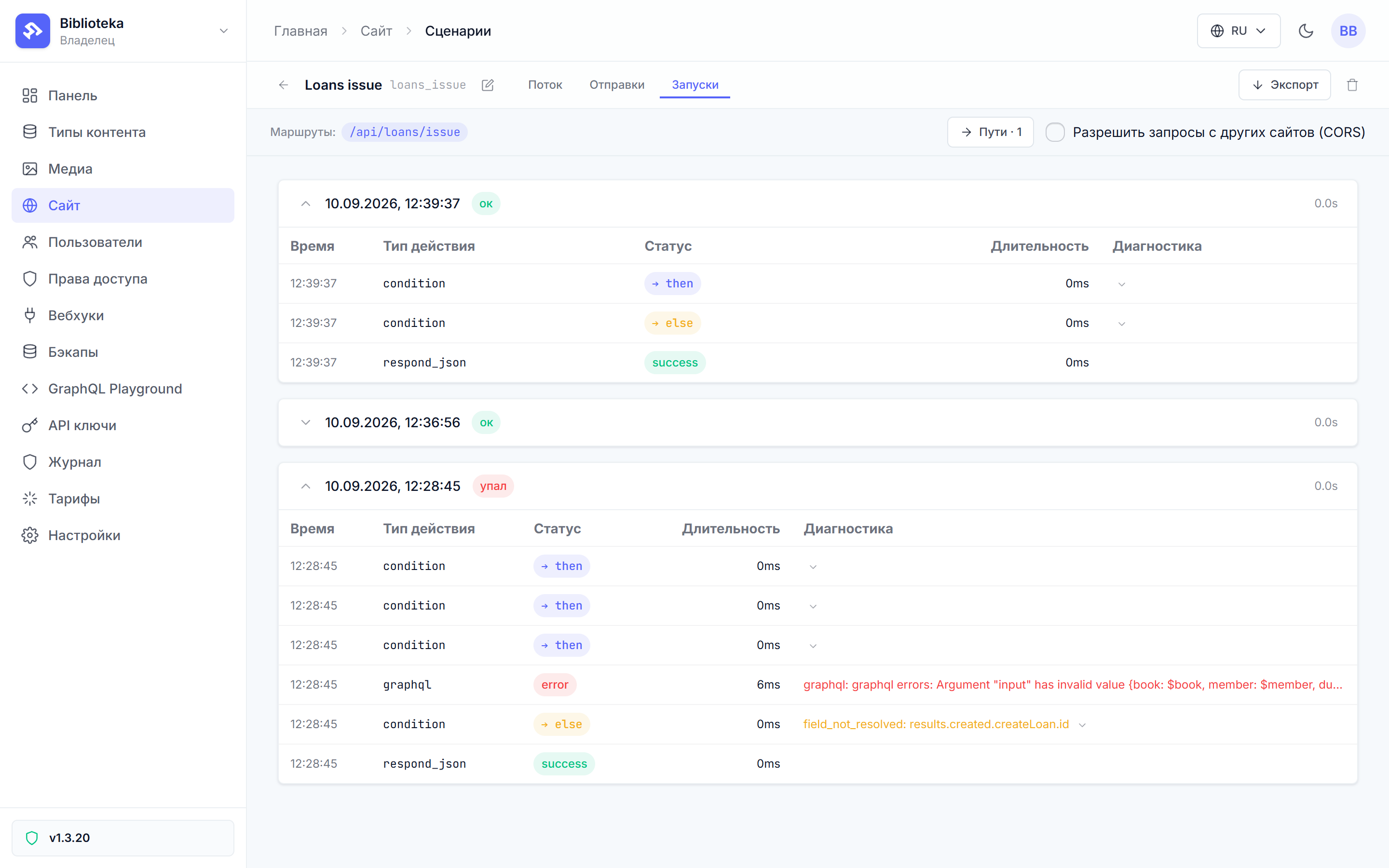
Blind trust in a green rehearsal is at fault here; the agents did nothing wrong. The instruction demands a live check after publishing for a reason: dry-run answers “are the branches wired correctly”, the run journal answers “what did GraphQL actually say”.
The human check
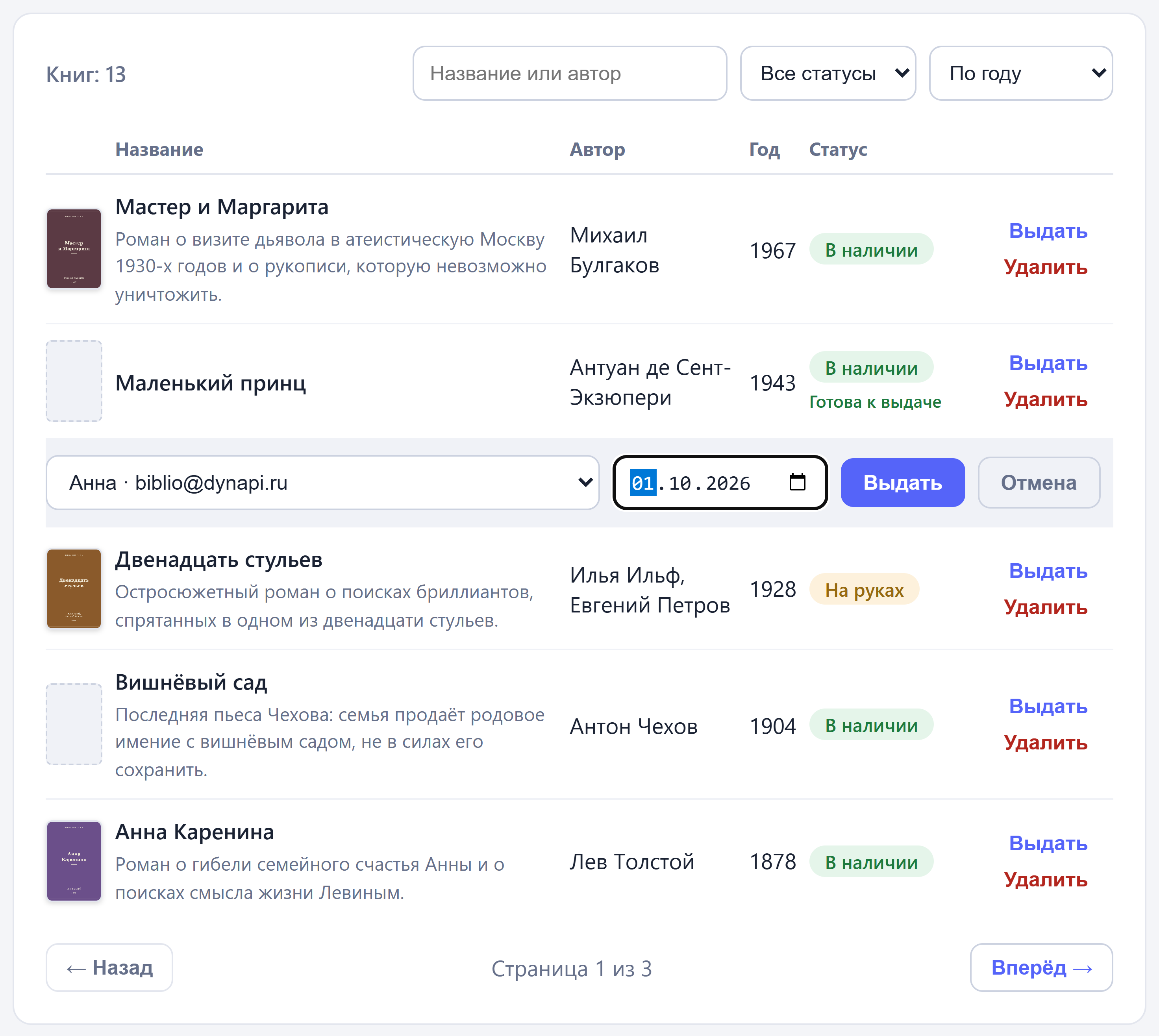
The agent is done — the human’s turn. In the admin, each book gained a “Выдать” button that unfolds a row with a reader select and a due date.
Under the catalog sits the active-loans panel. “Мастер и Маргарита” is out with a reader until September 24, and the “Вернул” button closes the loan:

The live check covered every branch, not just the happy one: issuing without a reader returned 400 with the select highlighted, a return removed the row from the panel, and a sessionless JSON request got 403 AUTHENTICATION_REQUIRED instead of a redirect. The catalog from the series is live at biblio.dynapi.ru — reader reader@biblio.test, password chitalka-2026; try the loans yourself.
What the agent is not given
The platform deliberately ships without a built-in agent. An agent outside the platform works with exactly the rights you issued — and not one more. A key with three scopes cannot change the plan, delete the project, or see other projects. A key is revoked with one button in the same section — when the agent’s session ends, so does the access.
Decisions stay with the human, and the instruction pins that down. What to build and why is written by a human. What NOT to build is listed in the out-of-scope section. Secrets are not handed to the agent inside the task text — the platform has the write-only store from the previous part, and this task had none at all.
Everything the agent built goes through the usual review path: the type, the four flows, the library entries, the updated Vue app, and the INSTRUCTION-LOANS.md itself all sit in the step-10-loans branch of the demo repository. It reads like an ordinary pull request.
The loop closes here. Seven parts describe one path: content types become a GraphQL schema, flows become pages and API endpoints, the site lives on a single origin — and the building can be trusted to a human or to an agent. Either hand will do.
Out of frame
flowctl entity create fills types with records — the catalog seeds in the repository were loaded exactly that way. The skill package updates with the platform: the agent-skill pages are built from the same repository as the code and land in the sitemap as documentation.
For bigger jobs the instruction grows into a plan with stages and checks — the mechanics stay the same: outcome, contracts, rules, out of scope. The due_date story is the best candidate for an addition to the skill’s reference: fields in GraphQL are named exactly as their slugs, and camelCase does not live there.
All posts