Building a closed Vue admin from your site's flows
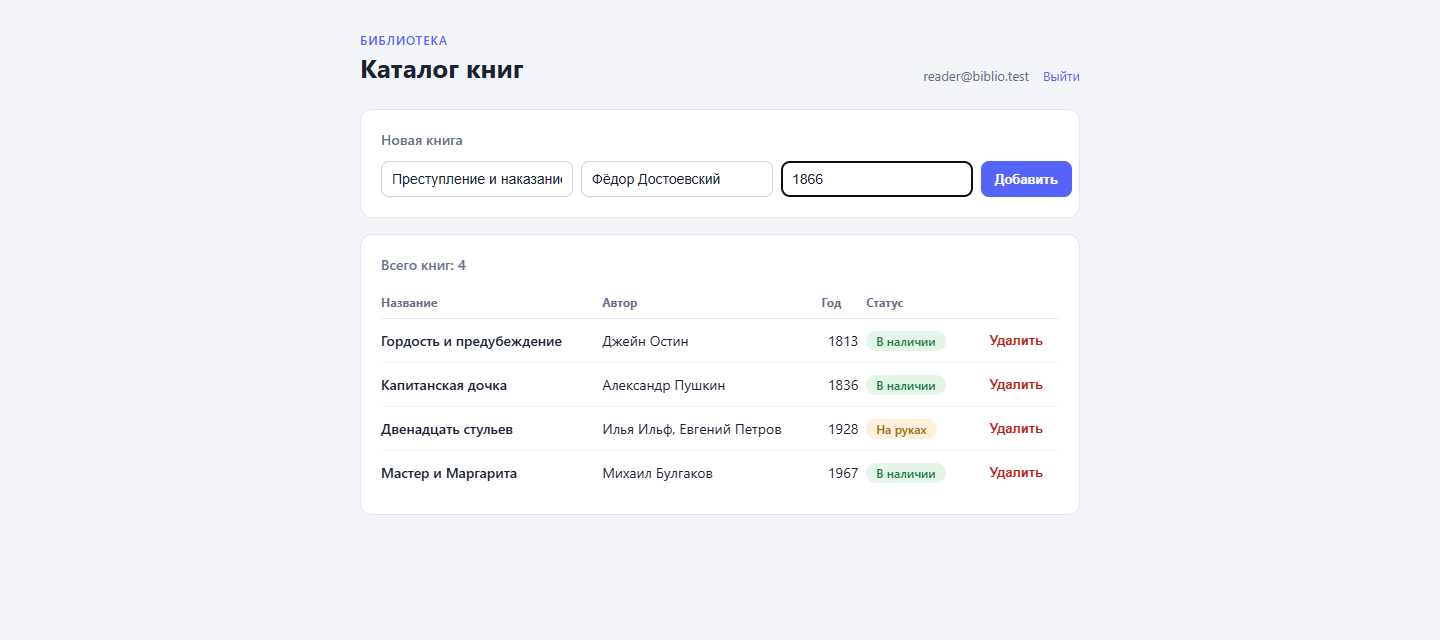
Every project on DynapiCMS ships with a built-in admin panel. Sometimes a project needs a second one: its own, shaped around a specific job, open to a small group of people. This article is a step-by-step walkthrough of assembling one from what the platform already has: content types, flows, and the site’s static files. You can follow along while reading — every demo file lives in the dynapi-vue-admin repository, and its branches mirror the steps.
We are building a library catalog: a Vue app listing books, sign-in with email and password, adding and removing records. GraphQL stays inside the platform the whole time.
Step 1. Content types
Two types. Book: title and author (strings, required), year (integer), status (a select with two options — in_stock labeled “In stock”, on_loan labeled “On loan”, default in_stock). Reader is a staff account: email (string, required), password, verified.
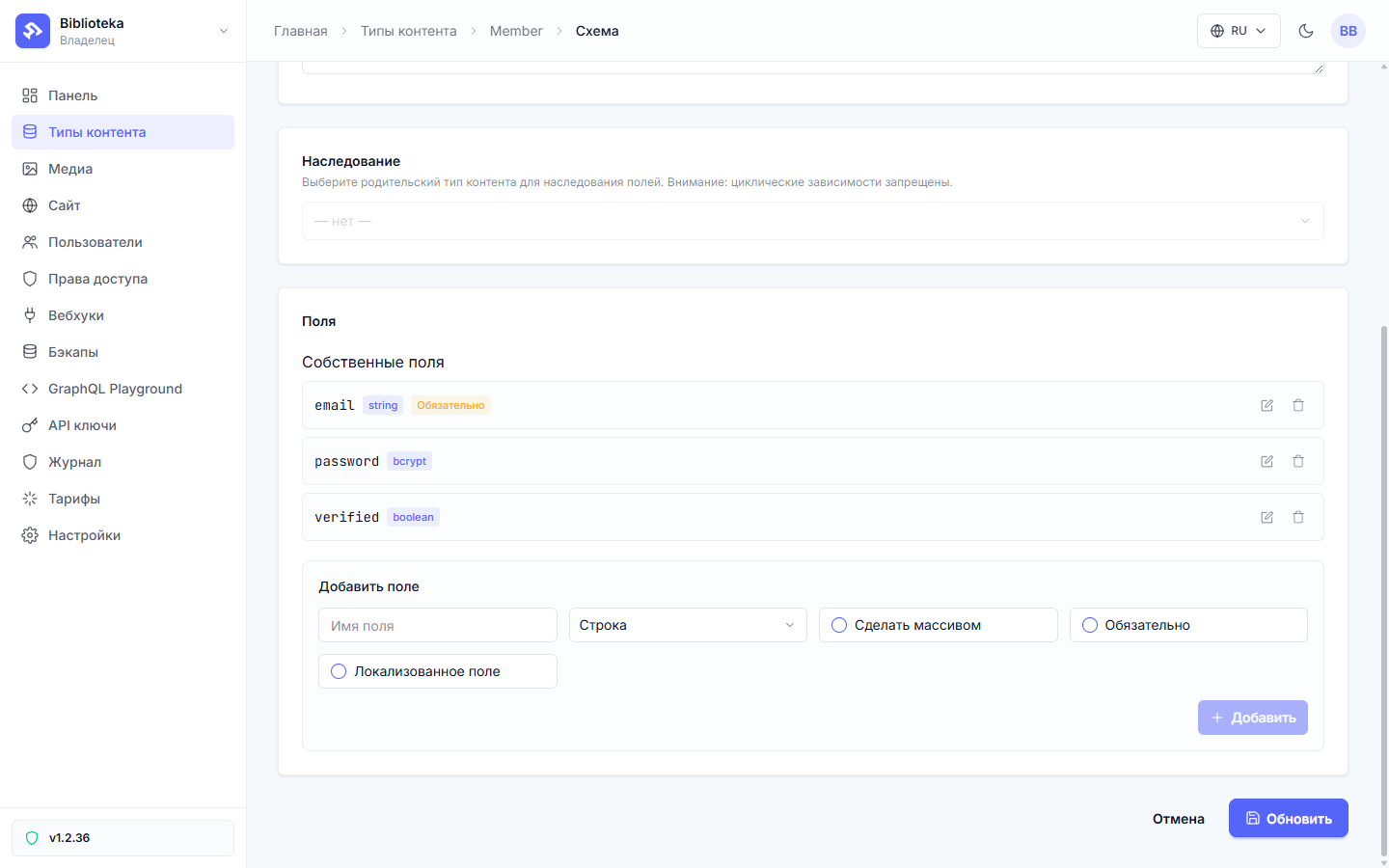
The password field uses the bcrypt type: the value is hashed on write, and only the render service key can read the hash back. No request ever serves it to a browser.
Step 2. Sign-in and sign-out from a preset
The flow editor ships a gallery of presets. The Sign-in preset assembles a complete chain and offers to create the missing type with one click — exactly the email, password and verified shape.
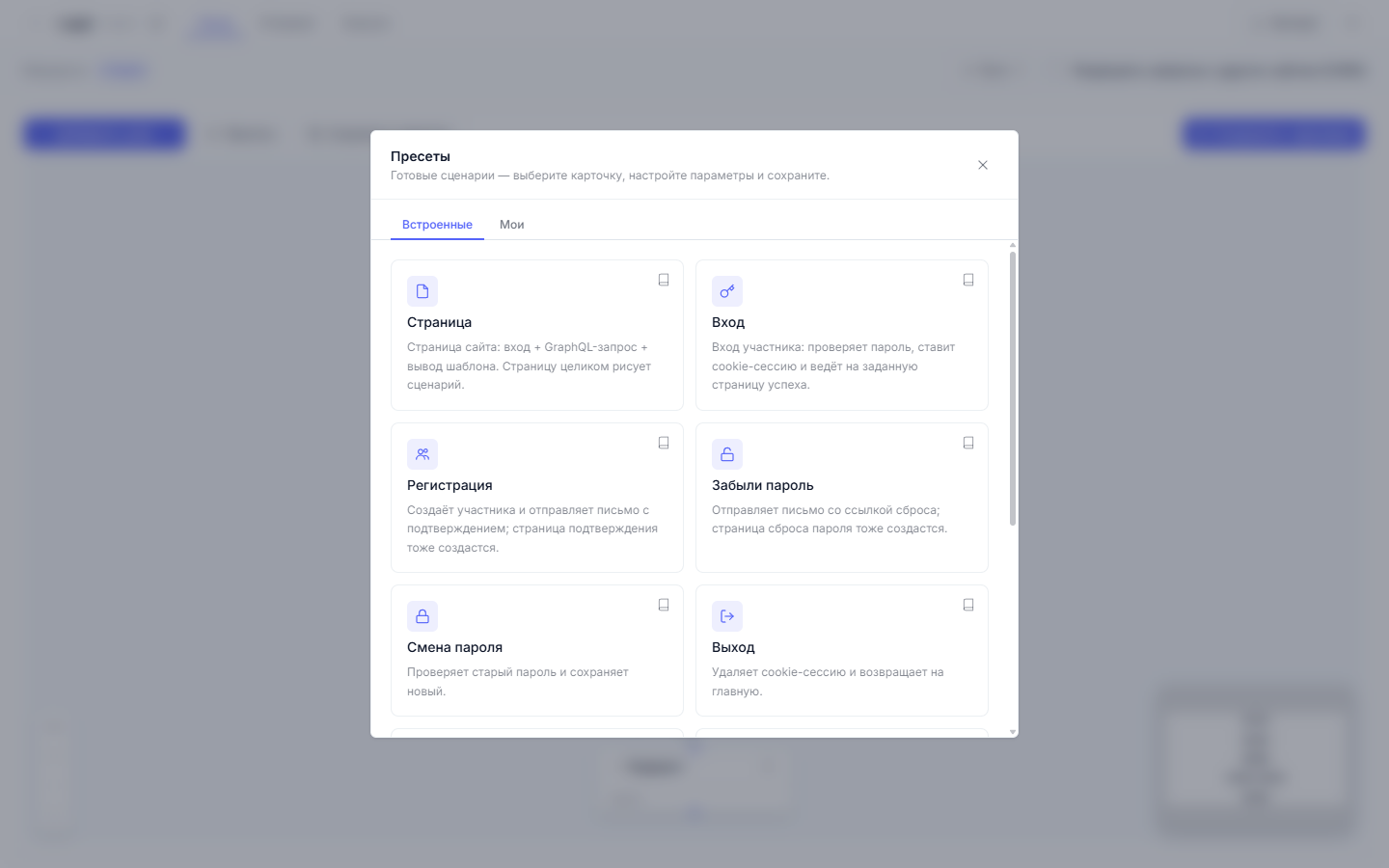
Why a preset instead of building it from scratch. The sign-in chain is where a homemade solution costs the most when it goes wrong: comparing a password against a hash, session lifetime, failure behavior, tamper protection. The preset assembles a proven configuration of those nodes, and it is no black box — a regular flow document you can open in the editor and adjust. In the demo we change one node: the redirect after a successful sign-in goes to /admin instead of the home page.
The result: a GraphQL node looks up the record by the email from the form, a condition checks the password with the bcrypt_matches operator, set_cookie establishes the session, and a redirect lands the person on the success page. A wrong password sends them back to /login?failed=1.
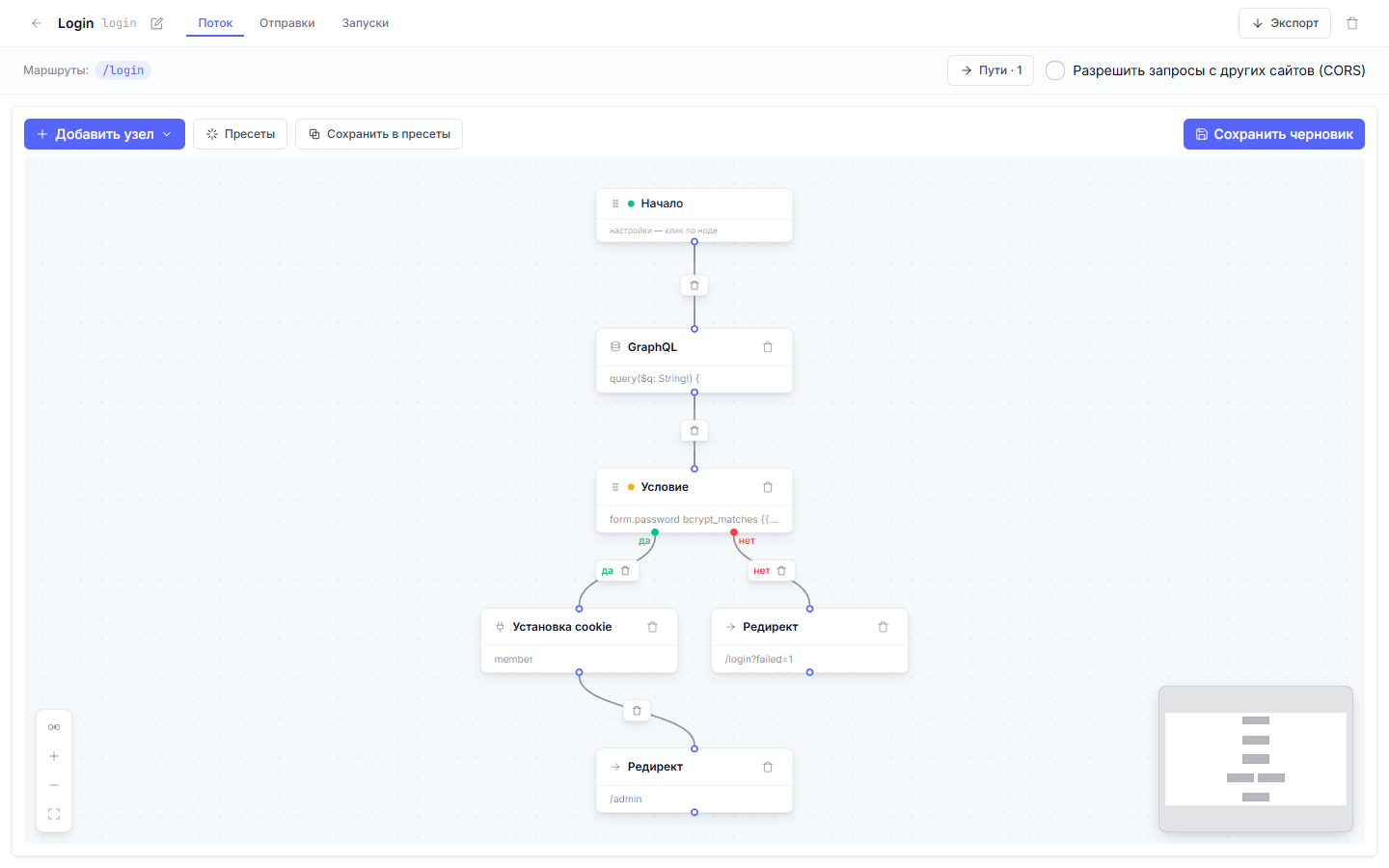
The cookie is named member, lives for 30 days, and carries the HttpOnly, Secure and SameSite=Lax flags. It holds no reader data inside, just an AES-sealed signed token: logs and browser history leak nothing readable, and only the project’s server can unwrap it.
Step 3. A JSON API made of flows
The catalog needs three operations: list, add, remove. Each one is a regular site route with a flow attached. A flow (that is its name in code) is built from nodes; this catalog needs two actions: graphql reads the project’s data, respond_json answers the client.
The list flow binds to GET /api/books and fits in one file:
{
  "version": 2,
  "nodes": [
    { "id": "n_start", "type": "entry", "data": {} },
    {
      "id": "a_q",
      "type": "action",
      "data": {
        "action_type": "graphql",
        "config": {
          "query": "query { books(limit: 200, orderBy: [{field: CREATED_AT, direction: DESC}]) { id title author year status } }",
          "result_key": "books"
        }
      }
    },
    {
      "id": "a_out",
      "type": "action",
      "data": {
        "action_type": "respond_json",
        "config": { "status": 200, "body_expr": "results.books" }
      }
    }
  ],
  "edges": [
    { "from": "n_start", "to": "a_q", "branch": "" },
    { "from": "a_q", "to": "a_out", "branch": "" }
  ]
}
This is the export format (.dynflow.json) — the same document behind the canvas graph in the editor, downloadable via the Export button. On the canvas it looks like connected cards.
body_expr is the modern way to build a JSON answer. It is expr (expr-lang): the value is computed as data and JSON-encoded whole — numbers stay numbers, arrays stay arrays, and invalid JSON is impossible by construction. The Liquid form body_template: "{{ results.books | json }}" is a relic: since v1.4.16 Liquid is removed from the “JSON response” “Body (template)”, the key became a static string, and in the old demo repo branches such an assembly would reach the client verbatim. New flows start with body_expr. The split is simple: documents (emails, texts, cookie/redirect values) are templated by Liquid, values are computed by expr.
POST bodies are parsed into namespaces. A site form lands in form., JSON in json., XML in xml.*. The app sends fetch with Content-Type: application/json, so fields read as json.title and json.author. A request with a foreign Content-Type gets a 415 back.
The add flow takes POST /api/books/add. The whole mutation variable map is built by variables_expr — a single expr string. Fields arrive typed: number() strictly coerces the string to a number, ?? substitutes the right side when the left is nil.
{
  "id": "a_create",
  "type": "action",
  "data": {
    "action_type": "graphql",
    "config": {
      "query": "mutation($title: String!, $author: String!, $year: Int, $status: String) { createBook(input: {title: $title, author: $author, year: $year, status: $status}) { id title author year status } }",
      "variables_expr": "{ \"title\": json.title, \"author\": json.author, \"year\": number(json.year) ?? 0, \"status\": json.status ?? \"in_stock\" }",
      "result_key": "created"
    }
  }
}
A respond_json node with body_expr: "results.created" sits behind it, so the client receives the new record and refreshes the list (the Liquid form body_template: "{{ results.created | json }}" is a relic: since v1.4.16 it no longer renders, body_expr builds the body). Removal works the same way: deleteBook by json.id and a short {ok: true}.
The legacy path puts the same fields in the variables object as Liquid strings: "year": "{{json.year | plus: 0}}", "status": "{{json.status | default: \"in_stock\"}}". It still works and stays for existing flows: Liquid in variables is string assembly, while variables_expr passes typed values.
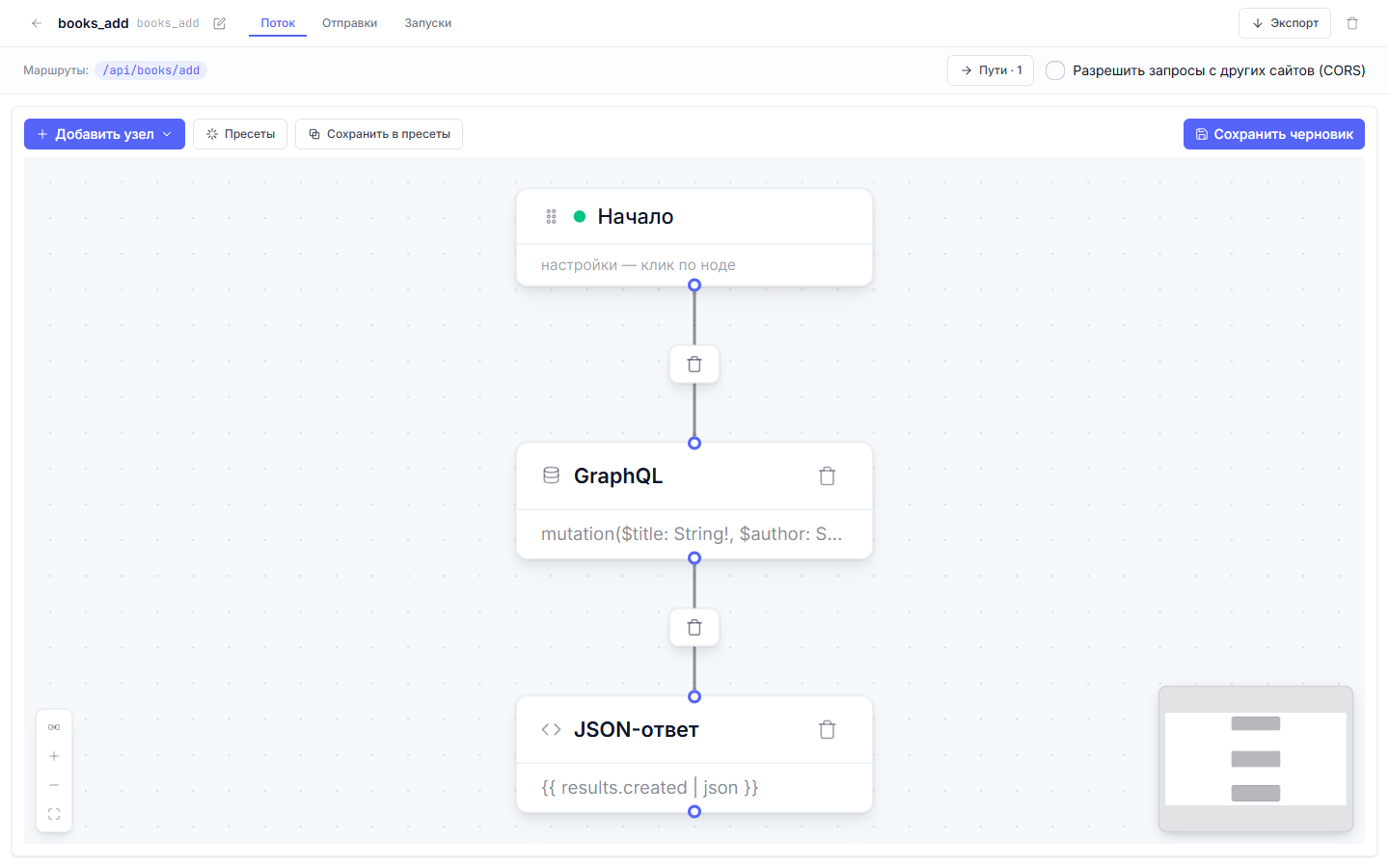
Routes assemble into one map published with a single command. Closed routes carry membersOnly with the login page address:
[
  { "path": "/login", "methods": ["GET", "POST"], "cache": { "defaultTtl": 0 },
    "flows": [ { "handle": "login_page", "methods": ["GET"] }, { "handle": "login", "methods": ["POST"] } ] },
  { "path": "/api/books", "methods": ["GET"], "cache": { "defaultTtl": 0 },
    "membersOnly": true, "loginPath": "/login",
    "flows": [ { "handle": "books_list", "methods": ["GET"] } ] }
]
The full six-route map lives in the repository, file files/routes.json; flowctl route save files/routes.json --publish publishes it in one go.
You can exercise a flow before publishing with flowctl dryrun books_add.dynflow.json --context ctx.json — the person assembling the admin runs it, and the platform executes the document with a side-effect-free clone of the engine. The context simulates a request: method, body content type and the body itself as a string:
{ "method": "POST", "bodyContentType": "application/json", "body": "{\"title\":\"Test\",\"author\":\"Someone\",\"year\":1984}" }
The report shows how every node ran and which directives the flow would have issued to the client. GraphQL nodes are mocked during the run — supply the expected result in the context’s graphqlResults, and conditions will follow the real branches. After publication the journal lives in the admin, the Runs tab: each node’s hit count, the branch taken in a condition, durations, and request/response dumps with masked secrets.
Step 4. The wrapper: a Liquid template and static files
The SPA is built with Vite (Vue 3 + TypeScript) and lands in the site’s static storage with one command:
flowctl files push dist --as static --publish
The files end up under /static/, which the site serves before route handling. The /admin route serves a Liquid wrapper template — here it is in full:
<!doctype html>
<html lang="ru">
<head>
  <meta charset="utf-8">
  <meta name="viewport" content="width=device-width, initial-scale=1">
  <title>Catalog — Library</title>
  <link rel="stylesheet" href="/static/admin.css?v=4">
</head>
<body>
  <div id="app"></div>
  <script>
    window.__BOOT__ = {
      member: {{ member | json }},
      email: {{ results.me.members[0].email | json }}
    };
  </script>
  <script type="module" src="/static/admin.js?v=4"></script>
</body>
</html>
There is no mustache conflict, although Liquid parses {{ }} as its own output syntax and a naive copy of a Vue template into an HTML file would break on the first {{ title }}. The conflict never happens because Vite compiles .vue templates into render functions at build time: the shipped admin.js contains no decorative braces, and the wrapper keeps nothing but an empty div#app. A build-less app (Vue from a CDN with the template in HTML) would need v-pre or custom delimiters instead.
The static links are versioned (?v=4), so a browser never keeps a stale admin.js after a redeploy. The suffix is transparent to the file server; the same file is served. The window.BOOT script in the middle carries server-assembled data — step 7 covers it.
Step 5. The Vue app
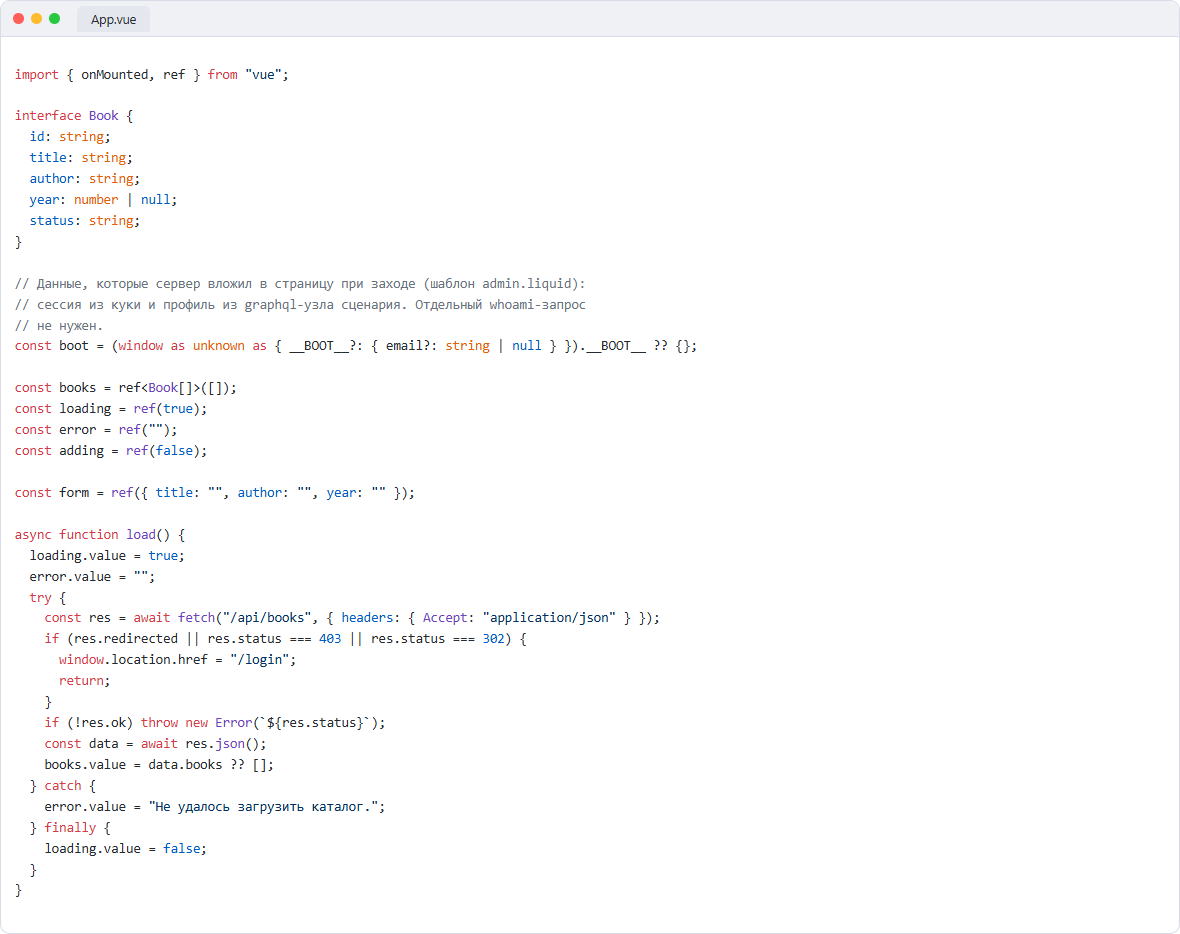
The app needs neither Apollo nor even its own cookie layer: every request goes to the same routes, and the member cookie rides along with each fetch on its own, because the app and the API share one origin. The whole data layer is three functions in src/App.vue:
const boot = (window as any).__BOOT__ ?? {};
const books = ref<Book[]>([]);
const form = ref({ title: "", author: "", year: "" });

async function load() {
  const res = await fetch("/api/books", { headers: { Accept: "application/json" } });
  if (res.redirected || res.status === 403) {
    window.location.href = "/login";
    return;
  }
  books.value = (await res.json()).books ?? [];
}

async function add() {
  const res = await fetch("/api/books/add", {
    method: "POST",
    headers: { "Content-Type": "application/json", Accept: "application/json" },
    body: JSON.stringify({
      title: form.value.title,
      author: form.value.author,
      year: form.value.year ? Number(form.value.year) : null,
    }),
  });
  if (res.ok) {
    form.value = { title: "", author: "", year: "" };
    await load();
  }
}

async function remove(id: string) {
  await fetch("/api/books/delete", {
    method: "POST",
    headers: { "Content-Type": "application/json" },
    body: JSON.stringify({ id }),
  });
  await load();
}

onMounted(load);
The redirect to /login is the gate showing through: when the session has expired, the API stops serving data and sends the person to the login page instead. The component template is a plain table over that state:
<tr v-for="b in books" :key="b.id">
  <td class="title">{{ b.title }}</td>
  <td>{{ b.author }}</td>
  <td class="num">{{ b.year ?? "—" }}</td>
  <td><span class="pill" :class="b.status === 'on_loan' ? 'loan' : 'stock'">{{ statusLabel(b.status) }}</span></td>
  <td class="num"><button class="del" @click="remove(b.id)">Delete</button></td>
</tr>
Step 6. Styles and themes
The markup is styled by CSS from the same .vue file: Vite moves the block into a separate admin.css — the one the wrapper links. Themes live on CSS variables, and the contract is the platform’s own: a data-theme attribute on with the values dynamica-light and dynamica-dark.
:root, [data-theme="dynamica-light"] {
  --bg: #f4f5f8; --panel: #fff; --text: #1a2233;
  --pill-stock-bg: #e5f5ea; --pill-stock-fg: #1d7a3d;
  --pill-loan-bg: #fdf1dc; --pill-loan-fg: #96690f;
}
[data-theme="dynamica-dark"] {
  --bg: #0d1528; --panel: #16203a; --text: #e8ebf4;
  --pill-stock-bg: #163524; --pill-stock-fg: #67d98c;
  --pill-loan-bg: #3a2f14; --pill-loan-fg: #eec27a;
}
body { margin: 0; background: var(--bg); color: var(--text); font-family: system-ui, sans-serif; }

.pill.stock { background: var(--pill-stock-bg); color: var(--pill-stock-fg); }
.pill.loan  { background: var(--pill-loan-bg);  color: var(--pill-loan-fg); }
At startup the app reads the same dynamica-theme localStorage key as the rest of the site and sets the attribute, so dark mode turns on by itself. A Tailwind-based project would use the same data-theme technique with @theme variables; the demo stays on plain CSS to keep dependencies out of the article.
Step 7. Data at entry: the boot payload
The app fetches the book list itself, but the facts about who opened the page can arrive before the first fetch. The /admin route binds GET to a two-node flow:
{
  "version": 2,
  "nodes": [
    { "id": "n_start", "type": "entry", "data": {} },
    {
      "id": "a_me",
      "type": "action",
      "data": {
        "action_type": "graphql",
        "config": {
          "query": "query($id: ID!) { members(where: {id: {eq: $id}}, limit: 1) { id email } }",
          "variables": { "id": "{{ member.id }}" },
          "result_key": "me"
        }
      }
    },
    {
      "id": "a_render",
      "type": "action",
      "data": {
        "action_type": "render",
        "config": { "template": "admin.liquid" }
      }
    }
  ],
  "edges": [
    { "from": "n_start", "to": "a_me", "branch": "" },
    { "from": "a_me", "to": "a_render", "branch": "" }
  ]
}
Here is the mechanics. Inside a flow the session is available as member.*: what the login preset sealed into the cookie lands in the flow context, and {{ member.id }} puts the reader’s id into the query variable. The graphql node fetches the profile, the result settles into results.me, and the render node lays out the template with the same context. The template stashes both into window.__BOOT__, the app reads them at mount time and paints the email into the header — no whoami request.
Two cases are worth keeping in mind. If the graphql node fails (on_error: continue), results.me stays empty, __BOOT__ carries email: null, and the UI shows a neutral label. And for pages assembled from the query library (route queryRefs) there is also the reserved $member variable: the platform injects the session id into it and overwrites any client-supplied value, so filtering by someone else’s id through it is a dead end.
Why this stays closed
An anonymous GET on a members_only page is redirected to the login page (302). An anonymous POST is rejected before the flow starts running: a JSON client receives 403 AUTHENTICATION_REQUIRED, a browser form gets a 303 to the login address. No request budget is spent on either.
Identification happens on the server. In a flow the member.* context is assembled from the signed cookie, which the browser can neither read (HttpOnly) nor forge. On the query path a client-supplied $member value is overwritten with the session id. Session-dependent responses bypass the shared page cache entirely: one reader never sees another reader’s version of a page.
One more thing to know in advance: with captcha enabled in the render settings, every public POST, sign-in included, must carry a token or the server answers 403 CAPTCHA_FAILED. A POST from a foreign Origin is rejected with REQUEST_ORIGIN_DENIED, which is the login-CSRF guard. The example in this article runs without captcha; production setups add it with the Captcha form preset.
The repository and files
All demo files are collected in dynapi-vue-admin: flows/*.dynflow.json — flows in the import format (flowctl apply flows/books_list.dynflow.json --publish), files/routes.json — the route map, templates/ — the wrapper and the login page, spa/ — the app, seed/ — starter records. The branches mirror the article steps: step-2-auth — after sign-in and sign-out, step-3-api — after the JSON API and routes, step-4-spa — after the wrapper and the app, main — everything together. The Sign-in preset guide is in the documentation.
All posts